PEDS
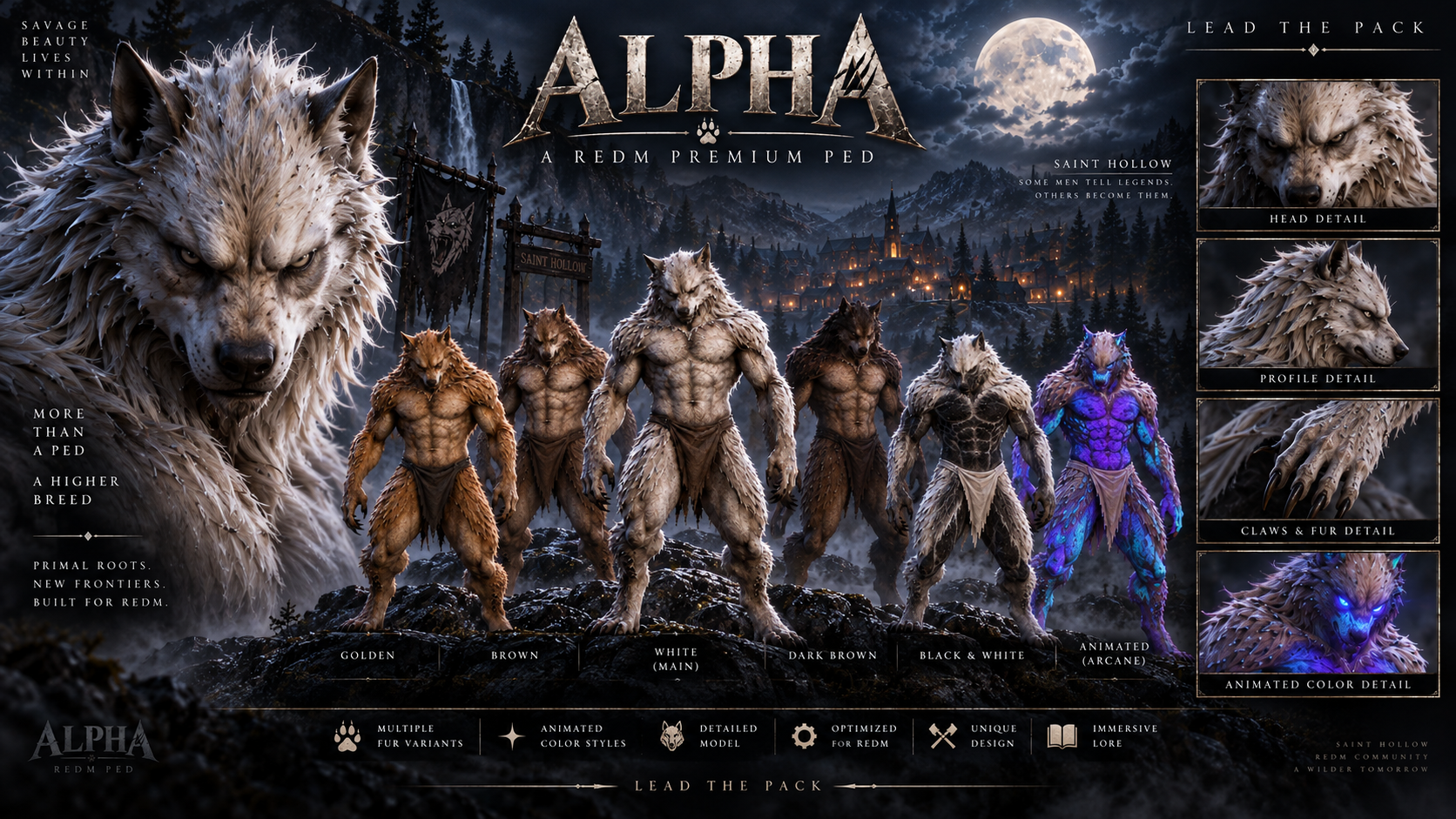
Alpha — Premium Werewolf Ped for RedM
Unleash the beast with Alpha, a premium werewolf ped for RedM. Its powerful muscular build, detailed fur, sharp claws, and intimidating wolf-like appearance make Alpha perfect for characters who command attention.
Choose from several natural and supernatural coat styles, including two distinctive variants with animated color-flow effects.
Included
Complete
alpha22resource prepared for installation.1 premium custom werewolf ped.
3 internal RedM model profiles.
9 selectable appearances.
7 static coat variants:
Original.
Blonde.
White.
Orange.
Brown.
Bicolor.
Negative.
2 animated color-flow variants:
Purple, blue, and cyan.
Black and grey.
High- and low-resolution textures with mipmaps.
Configuration files.
Installation guide.
Main command:
/alpha.Additional commands for selecting coats and animated variants.
Commands
/alpha— loads the original Alpha./alpha rubio— blonde coat./alpha blanco— white coat./alpha naranja— orange coat./alpha marron— brown coat./alpha bicolor— bicolor coat./alpha negativo— static supernatural negative coat./alphacolor [variant]— changes the static coat while using Alpha./alphaflujo— purple, blue, and cyan animated-flow variant./alphanegro— black and grey animated-flow variant.
The command parameters remain in Spanish as shown above.
Requirements
RedM.
VORP Core.
Optional integration with
paulcript_pedmenu: it is not required to use the ped.By default, access is restricted to the VORP groups
admin,superadmin,owner, andmoderator. These permissions can be customized.
Installation
Copy the complete
alpha22folder into the server’sresourcesdirectory.Add
ensure alpha22toserver.cfg, afterensure vorp_core.Remove or stop any previous Alpha resource.
Restart the server and reconnect.
Only one version of Alpha should be active. Do not combine files from Alpha22 with older releases.
Protection and Files
Asset Escrow: enabled in the Cfx.re download. The Alpha model files and protected Lua scripts are delivered through Cfx.re Asset Escrow.
config.luaremains editable and controls optional ped-menu persistence. The authorized VORP groups are defined in the protected server script.Blender source files are not included.
Important
This purchase includes the Alpha ped and the nine appearances described above.
The animated color-flow variants are visual material effects. They do not include powers, transformations, additional gameplay mechanics, or world lighting.
This product does not include a server, supernatural abilities, transformation systems, additional animations, or paulcript_pedmenu unless explicitly stated otherwise.
Do not run Alpha22 alongside another resource that replaces the same native clothing containers.
Demonstration
Real in-game RedM video.
Real in-game screenshots.
All showcased appearances must correspond to the included product
Support
Support is provided through the official PaulcripT Discord in the 〘🎟〙open-a-ticket channel.
What you receive: One custom werewolf ped with nine selectable appearances: seven static coats and two animated color-flow variants. The alpha22 resource includes the models, high- and low-resolution textures, configuration file, and installation guide. Requires RedM and VORP Core.
Download: Complete checkout with the Cfx.re account that owns your RedM server. After purchase, sign in with that account and download Alpha from Cfx.re Portal → Granted Assets.
Install: Extract the
alpha22folder into your server’sresourcesdirectory. Addensure alpha22afterensure vorp_coreinserver.cfg, then restart the server and reconnect. Keep only one version of Alpha active.Use: With an authorized VORP group, run
/alphato equip the original werewolf. Try/alpha blancofor the white coat,/alphaflujofor the violet, blue, and cyan flow, or/alphanegrofor the black and gray flow. The animated coats are visual effects.
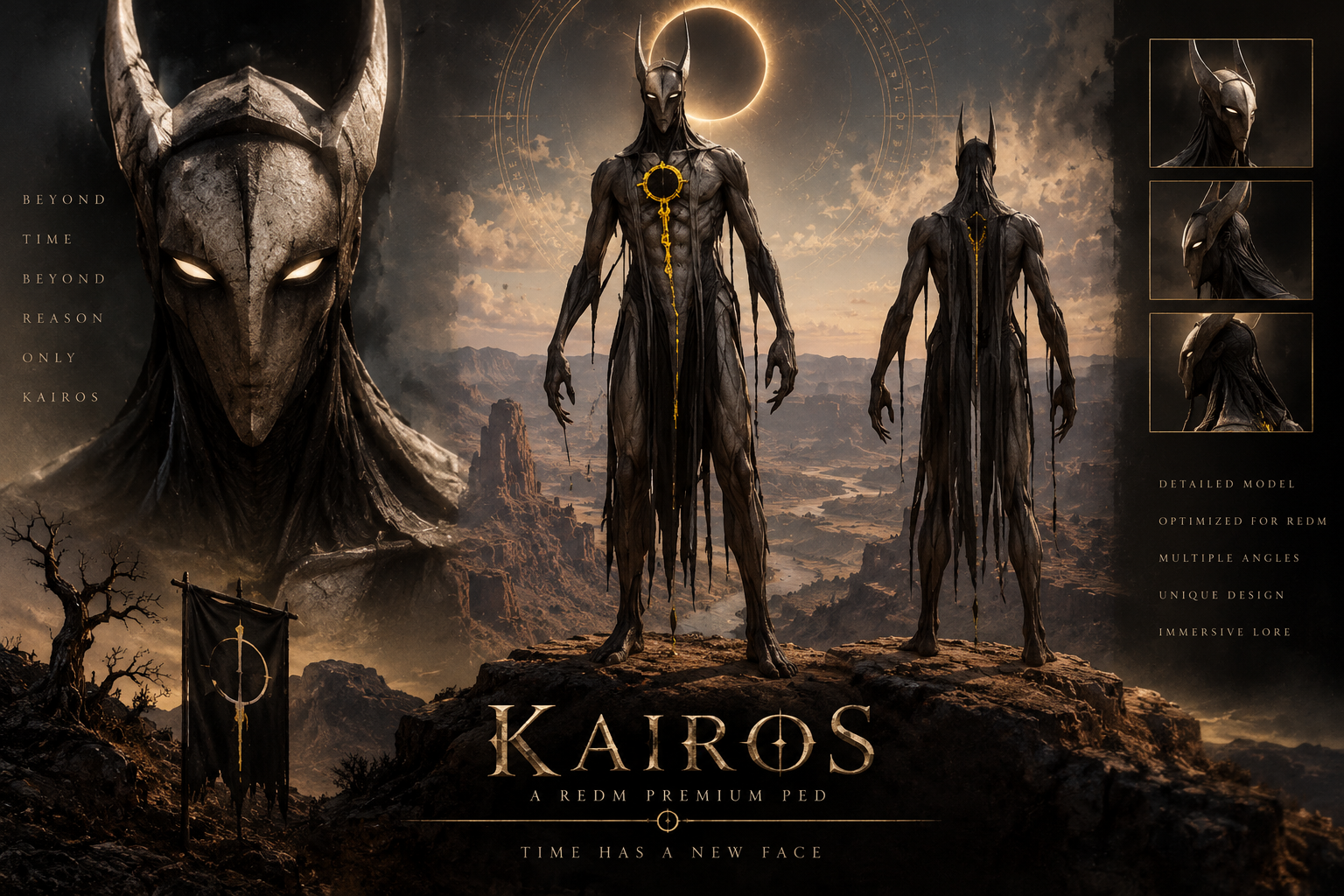
KAIROS — THE GOLDEN HOLLOW HERALD | REDM CUSTOM PED
Bring the supernatural presence of Kairos to your RedM server: an imposing custom character featuring animated yellow and golden details.
The ornaments across his chest, chain and back continuously flow between yellow and gold. His white emissive eyes remain illuminated and stand out especially at night.
Features
-
Complete custom ped for RedM.
-
Animated yellow and golden visual effects.
-
White emissive eyes that glow continuously and stand out at night.
-
Rig compatible with RedM multiplayer animations.
-
Three Levels of Detail included.
-
Transformation command:
/kairos. -
Diagnostic commands:
/kairoscheckand/kairosdiag. -
Access controlled through VORP administrator groups.
-
Optional integration with
paulcript_pedmenu.
The eye effect is permanently active. It does not change the game time, weather or world lighting.
Included
-
Complete
kairo2RedM resource. -
Kairos character model.
-
High- and low-resolution textures.
-
Required RedM metadata.
-
Client and server scripts.
-
Configuration file.
-
Installation guide.
Editable Blender source files are not included.
Requirements
-
RedM.
-
vorp_core. -
paulcript_pedmenuis optional and is only used to save the selected ped.
By default, the /kairos command is available to the following VORP groups:
-
admin -
superadmin -
owner -
moderator
Installation
- Place the complete
kairo2folder inside your server’sresourcesdirectory. - Add the following line to
server.cfgaftervorp_core:
ensure kairo2
- Restart the resource or server.
- Have all players reconnect.
- Use
/kairosin game.
Only one version of Kairos should be active at a time.
Important Clothing Replacement Disclaimer
This custom ped works by replacing an original Red Dead Redemption 2 clothing asset.
The replaced asset is:
cs_abemaclean_ms1_coat_000.ydd
This is Abe Maclean’s coat. Its associated texture dictionaries are also replaced.
As a result:
-
Any NPC, outfit or resource using Abe Maclean’s coat may display the Kairos replacement.
-
Do not run another resource that replaces the same clothing asset.
-
Check your server for conflicting replacements before installation.
-
This product does not add a completely separate clothing slot.
Not Included
-
Special powers or abilities.
-
A separate transformation system.
-
Additional custom animations.
-
Changes to weather, time or global lighting.
-
paulcript_pedmenu. -
Editable Blender source files.
-
Custom server installation.
Delivery
This is a digital product for RedM. The complete resource and installation documentation are delivered through Tebex.
Support
Support is available through the official Discord server:
Join the Paulcript Support Discord
What you receive: One custom Kairos ped with animated yellow and gold accents across the chest, chain, and back, plus steady white emissive eyes. The kairo2 resource includes three levels of detail, high- and low-resolution textures, scripts, configuration, and an installation guide. Requires RedM and VORP Core.
- Download: Complete checkout with the Cfx.re account that owns your RedM server. After purchase, sign in with that account and download kairos from Cfx.re Portal → Granted Assets.
- Install: Extract
kairo2intoresources. Addensure kairo2afterensure vorp_coreinserver.cfg, then restart the server and reconnect. Stop any older Kairos resource before starting this one. - Use: Run
/kairoswith an authorized VORP group to equip the ped. Use/kairoscheckto check whether the model loads without changing your current appearance.
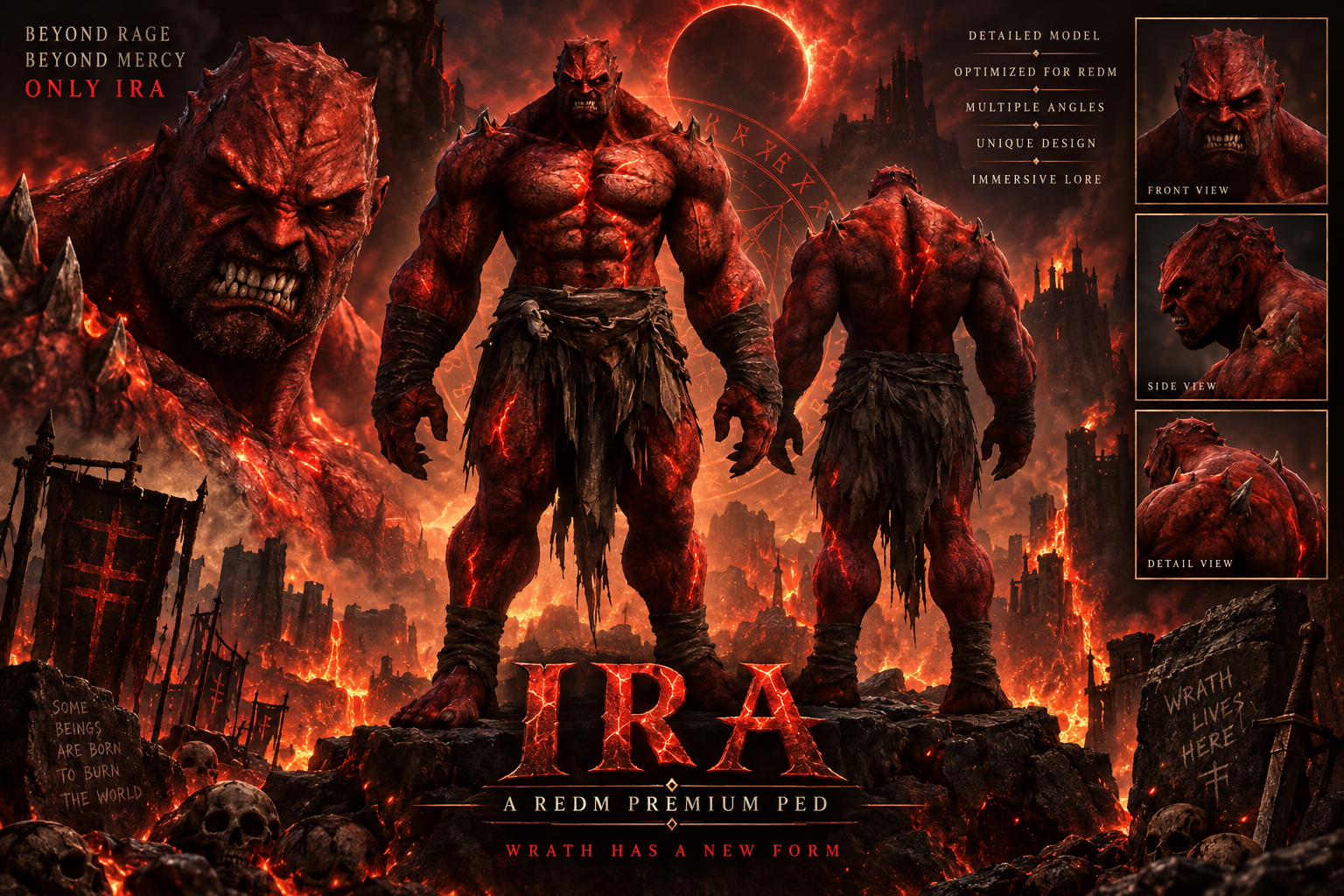
IRA — THE CRIMSON WARLORD | REDM CUSTOM PED
Bring the imposing presence of Ira, the Crimson Warlord, to your RedM server.
This custom ped features a powerful demonic design, original high-resolution textures and a complete rig prepared for RedM multiplayer animations.
Features
-
Complete custom ped for RedM.
-
Original Crimson Warlord model and textures.
-
Rig compatible with RedM multiplayer animations.
-
Three Levels of Detail included.
-
Transformation command:
/ira. -
Alternative command:
/p_ped_ira. -
Diagnostic commands:
/iracheckand/iradiag. -
Access controlled through VORP administrator groups.
-
Optional integration with
paulcript_pedmenu. -
No forced posture or changes to movement, controls, health or damage.
Included
-
Complete
pecado_iraRedM resource. -
Ira — Crimson Warlord character model.
-
High- and low-resolution textures.
-
Required RedM metadata.
-
Client and server scripts.
-
Configuration file.
-
Installation guide.
Editable Blender source files are not included.
Requirements
-
RedM.
-
vorp_core. -
paulcript_pedmenuis optional and is only used to save the selected ped.
By default, the /ira command is available to the following VORP groups:
-
admin -
superadmin -
owner -
moderator
Installation
- Place the complete
pecado_irafolder inside your server’sresourcesdirectory. - Add the following line to
server.cfgaftervorp_core:
ensure pecado_ira
- Restart the resource or server.
- Have all players reconnect.
- Use
/irain game.
Do not run pecado_ira and the previous pecado-original-ira resource at the same time.
Important Clothing Replacement Disclaimer
This custom ped works by replacing an original Red Dead Redemption 2 clothing asset.
The replaced asset is:
cs_mp_seth_ms1_pants_000.ydd
This is Seth’s pants component. Its associated texture dictionaries are also replaced.
As a result:
-
Any NPC, outfit or resource using Seth’s pants may display the Ira replacement.
-
Do not run another resource that replaces the same clothing asset.
-
Check your server for conflicting replacements before installation.
-
This product does not add a completely separate clothing slot.
Known Limitations
-
No custom facial rig or facial animations are included.
-
The lower garment does not use cloth simulation.
-
The character’s size and shape may cause occasional clipping with weapons, horses or certain animations.
Not Included
-
Special powers or abilities.
-
A separate transformation system.
-
Additional custom animations.
-
Changes to player health, damage, bleeding or controls.
-
paulcript_pedmenu. -
Editable Blender source files.
-
Custom server installation.
Delivery
This is a digital product for RedM. The complete resource and installation documentation are delivered through Tebex.
Support
Support is available through the official Discord server:
Join the Paulcript Support Discord
What you receive: One custom Crimson Warlord ped with its original model and textures, three levels of detail, and a RedM multiplayer rig. The pecado_ira resource includes the required metadata, client and server scripts, configuration, and an installation guide. Requires RedM and VORP Core.
- Download: Complete checkout with the Cfx.re account that owns your RedM server. After purchase, sign in with that account and download Ira from Cfx.re Portal → Granted Assets.
- Install: Extract
pecado_iraintoresources. Addensure pecado_iraafterensure vorp_coreinserver.cfg, then restart the server and reconnect. - Use: Run
/irawith an authorized VORP group to equip the ped./iracheckchecks model loading without changing your current appearance.
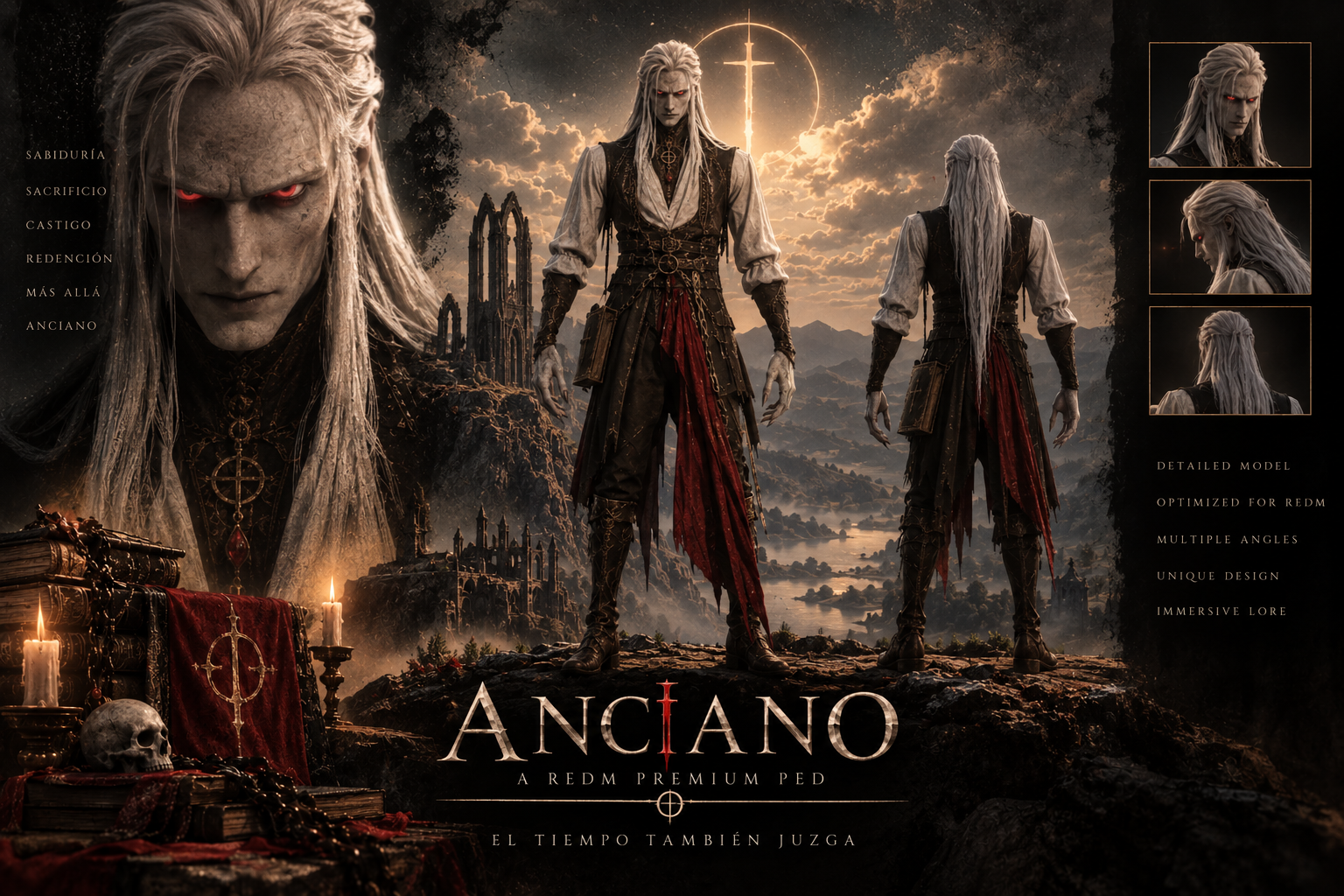
ANCIANO— THE CRIMSON NOCTURNE | REDM CUSTOM PED
Bring the dark and unsettling presence of Anciano, the Crimson Nocturne, to your RedM server.
This custom ped features a sinister elderly creature design, original crimson clothing and blood-red emissive eye sockets that remain illuminated and stand out especially in darkness.
Features
-
Complete custom ped for RedM.
-
Blood-red glowing eye sockets.
-
Permanent eye illumination with no flashing or animated movement.
-
Original Crimson Nocturne model and textures.
-
Rig compatible with RedM multiplayer animations.
-
Three Levels of Detail included.
-
Transformation command:
/anciano. -
Alternative command:
/p_ped_anciano. -
Diagnostic commands:
/ancianocheckand/ancianodiag. -
Access controlled through VORP administrator groups.
-
Optional integration with
paulcript_pedmenu. -
No forced posture or changes to movement, controls, health or damage.
The eye effect is permanently active and becomes especially noticeable at night. It does not change the game time, weather or world lighting.
Only the eyes use an emissive effect. The character’s crimson clothing does not glow.
Included
-
Complete
ancianoRedM resource. -
Anciano — Crimson Nocturne character model.
-
High- and low-resolution textures.
-
Required RedM metadata.
-
Client and server scripts.
-
Configuration file.
-
Installation guide.
Editable Blender source files are not included.
Requirements
-
RedM.
-
vorp_core. -
paulcript_pedmenuis optional and is only used to save the selected ped.
By default, the /anciano command is available to the following VORP groups:
-
admin -
superadmin -
owner -
moderator
Installation
- Place the complete
ancianofolder inside your server’sresourcesdirectory. - Add the following line to
server.cfgaftervorp_core:
ensure anciano
- Restart the resource or server.
- Have all players reconnect.
- Use
/ancianoin game.
Only one version of Anciano should be active at a time.
Important Clothing Replacement Disclaimer
This custom ped works by replacing an original Red Dead Redemption 2 clothing asset.
The replaced asset is:
cs_mp_gus_macmillan_ms1_coat_000.ydd
This is Gus Macmillan’s coat component. Its associated texture dictionaries are also replaced.
As a result:
-
Any NPC, outfit or resource using Gus Macmillan’s coat may display the Anciano replacement.
-
Do not run another resource that replaces the same clothing asset.
-
Check your server for conflicting replacements before installation.
-
This product does not add a completely separate clothing slot.
Known Limitations
-
No custom facial rig or facial animations are included.
-
Hair, lower garments, the book and hanging accessories do not use independent cloth simulation.
-
The character’s shape may cause occasional clipping with weapons, horses or certain animations.
-
The original physical collision data has not been rebuilt specifically for this character’s silhouette.
Not Included
-
Special powers or abilities.
-
A separate transformation system.
-
Additional custom animations.
-
Animated clothing glow or body-wide emission.
-
Changes to player health, damage, bleeding or controls.
-
Changes to weather, time or global lighting.
-
paulcript_pedmenu. -
Editable Blender source files.
-
Custom server installation.
Delivery
This is a digital product for RedM. The complete resource and installation documentation are delivered through Tebex.
Support
Support is available through the official Discord server:
Join the Paulcript Support Discord
What you receive: One custom Alucard ped with steady red emissive eyes, three levels of detail, and high- and low-resolution textures. The anciano resource includes the model, metadata, scripts, configuration, and an installation guide. Requires RedM and VORP Core.
- Download: Complete checkout with the Cfx.re account that owns your RedM server. After purchase, sign in with that account and download Anciano from Cfx.re Portal → Granted Assets. That is the name of the Alucard asset in the portal.
- Install: Extract
ancianointoresources. Addensure ancianoafterensure vorp_coreinserver.cfg, then restart the server and reconnect. - Use: Run
/ancianowith an authorized VORP group to equip Alucard./ancianocheckchecks model loading without changing your current appearance.
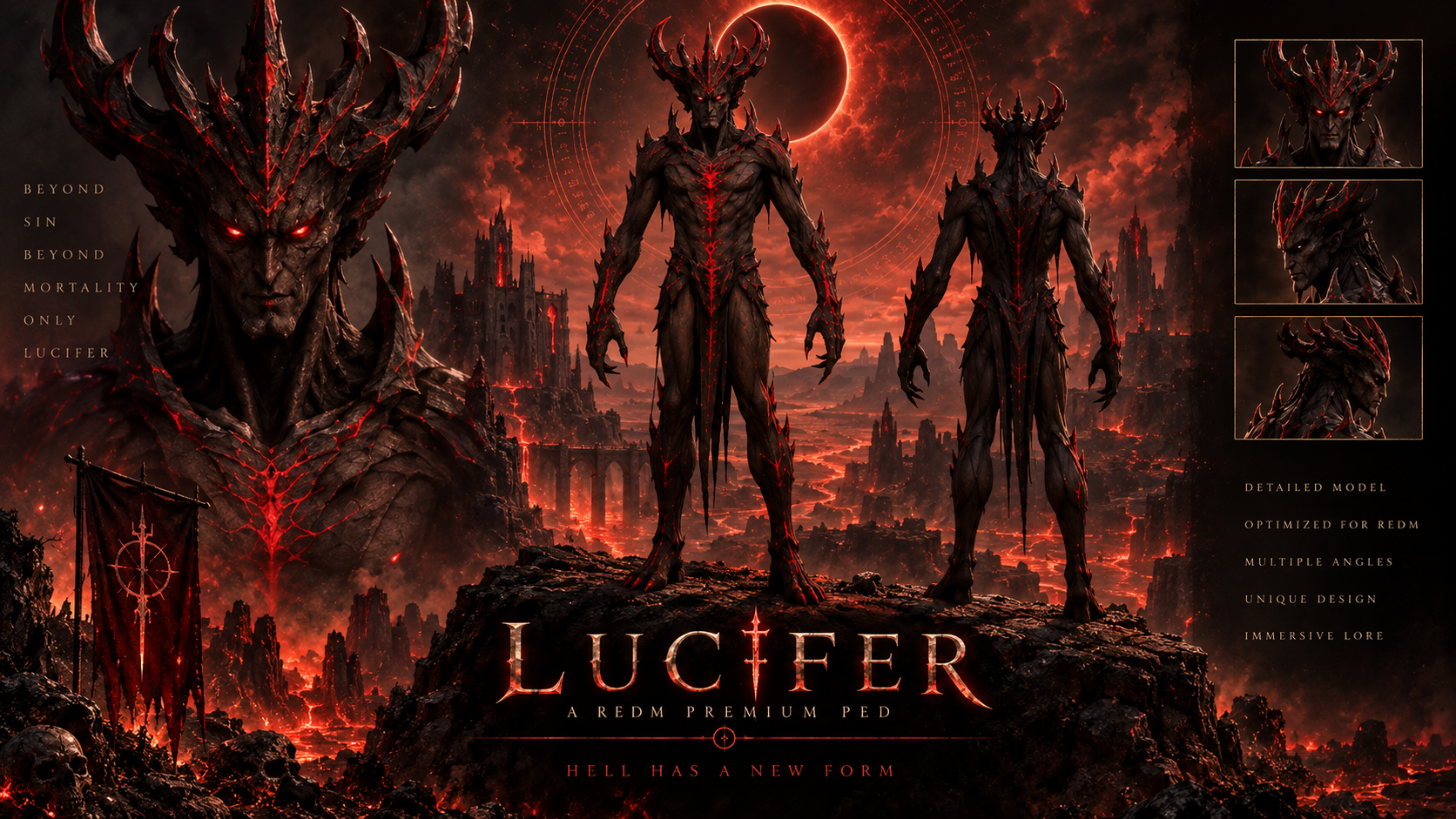
LUCIFER — THE LIGHTBRINGER | REDM CUSTOM PED
Bring the dark presence of Lucifer, the Lightbringer, to your RedM server.
This custom ped features an imposing demonic design, original textures and a complete rig prepared for RedM multiplayer animations.
Features
-
Complete custom ped for RedM.
-
Detailed demonic character design.
-
Original Lucifer model and textures.
-
Native RedM male multiplayer skeleton.
-
Three Levels of Detail included.
-
Transformation command:
/lucifer. -
Diagnostic command:
/luciferdiag. -
Access controlled through VORP administrator groups.
-
No forced posture or changes to movement, controls, health or damage.
Included
-
Complete
prueba-luciferRedM resource. -
Lucifer — The Lightbringer character model.
-
High- and low-resolution textures.
-
Required RedM metadata.
-
Client and server scripts.
-
Installation documentation.
Editable Blender source files are not included.
Requirements
-
RedM.
-
vorp_core.
By default, the /lucifer command is available to the following VORP groups:
-
admin -
superadmin -
owner -
moderator
Installation
- Place the complete
prueba-luciferfolder inside your server’sresourcesdirectory. - Add the following line to
server.cfgaftervorp_core:
ensure prueba-lucifer
- Restart the resource or server.
- Have all players reconnect.
- Use
/luciferin game.
Only one version or copy of Lucifer should be active at a time.
Important Clothing Replacement Disclaimer
This custom ped works by replacing two original Red Dead Redemption 2 clothing assets.
The replaced assets are:
cs_mp_cliff_ms1_pants_000.ydd
cs_mp_cliff_ms1_boots_000.ydd
These are Cliff’s pants and boots components. Their associated texture dictionaries are also replaced.
As a result:
-
Any NPC, outfit or resource using Cliff’s pants or boots may display parts of the Lucifer replacement.
-
Do not run another resource that replaces either of these clothing assets.
-
Check your server for conflicting replacements before installation.
-
This product uses two existing clothing slots and does not add completely separate slots.
Known Limitations
-
No custom facial rig or facial animations are included.
-
The head and horns do not have independent facial animation.
-
Lower garments do not use independent cloth simulation.
-
The character’s shape may cause occasional clipping with weapons, horses or certain animations.
Not Included
-
Special powers or abilities.
-
A separate transformation system.
-
Additional custom animations.
-
Changes to player health, damage, bleeding or controls.
-
paulcript_pedmenu. -
Editable Blender source files.
-
Custom server installation.
Delivery
This is a digital product for RedM. The complete resource and installation documentation are delivered through Tebex.
Support
Support is available through the official Discord server:
Join the Paulcript Support Discord
What you receive: One custom Lucifer ped with a horned demonic design, a native RedM male multiplayer skeleton, three levels of detail, and high- and low-resolution textures. The prueba-lucifer resource includes the model, required metadata, scripts, and installation documentation. Requires RedM and VORP Core.
- Download: Complete checkout with the Cfx.re account that owns your RedM server. After purchase, sign in with that account and download Lucifer from Cfx.re Portal → Granted Assets.
- Install: Extract
prueba-luciferintoresources. Addensure prueba-luciferafterensure vorp_coreinserver.cfg, then restart the server and reconnect. - Use: Run
/luciferwith an authorized VORP group to equip the ped. Use/luciferdiagto print diagnostic information to the F8 console.
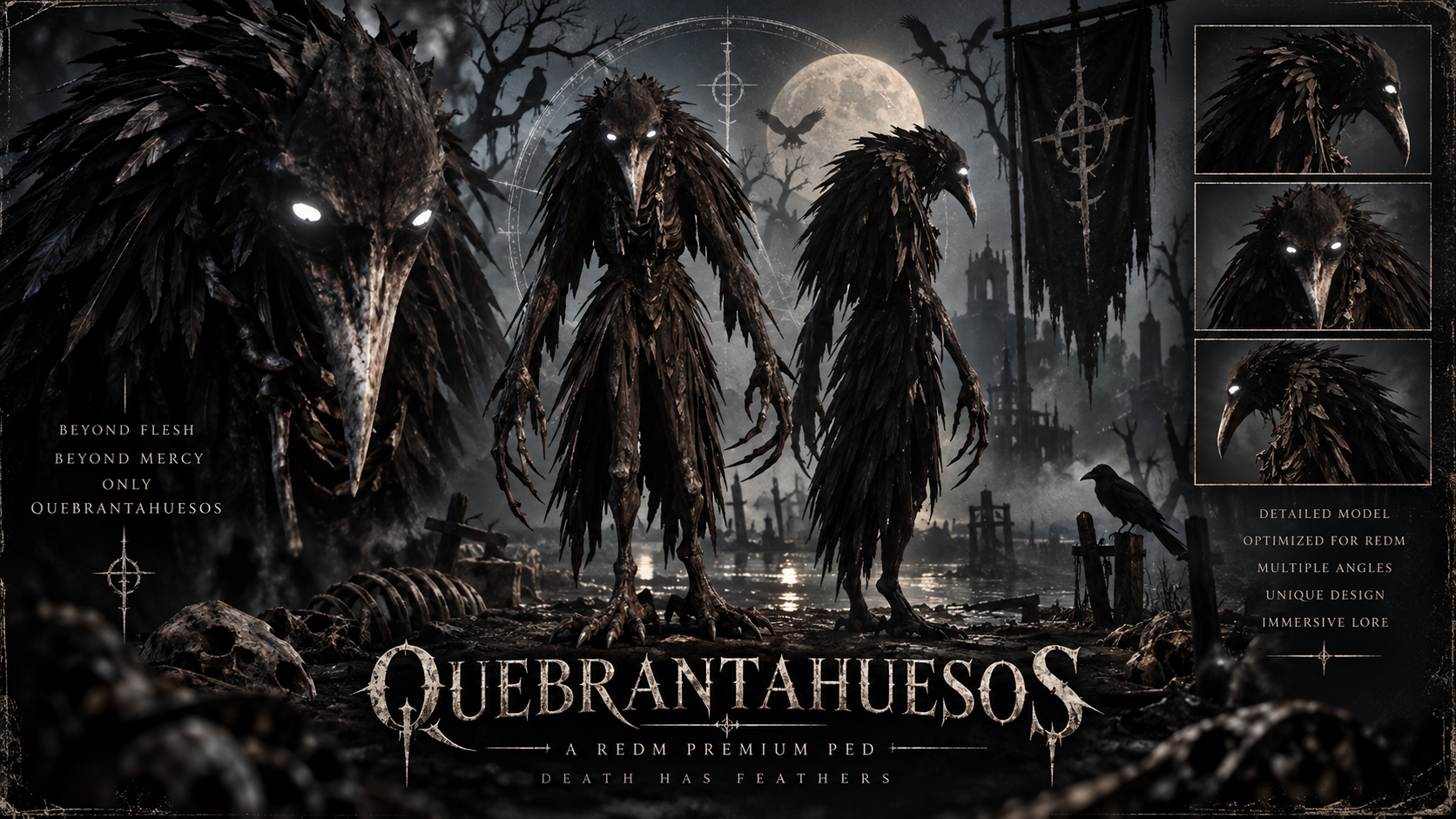
QUEBRANTAHUESOS — THE RAVEN DEMON | REDM CUSTOM PED
Bring Bonebraker, a dark Raven Demon with a skeletal head, sharp claws and an unsettling supernatural presence, to your RedM server.
Its black eyes contain subtle moving silver reflections. The effect remains inside the eyes without creating a bright ring around them.
Features
-
Complete custom Raven Demon ped for RedM.
-
Black eyes with subtle moving silver reflections.
-
Continuous eye effect with no flashing or time-based activation.
-
Original character model and textures.
-
Rig compatible with RedM multiplayer animations.
-
Three Levels of Detail included.
-
Transformation command:
/quebrantahuesos. -
Alternative command:
/p_ped_quebrantahuesos. -
Diagnostic commands:
/quebrantahuesoscheckand/quebrantahuesosdiag. -
Access controlled through VORP administrator groups.
-
Optional integration with
paulcript_pedmenu. -
No forced posture or changes to movement, controls, health or damage.
The eye effect is permanently active. It does not change the game time, weather or world lighting.
Included
-
Complete
quebrantahuesosRedM resource. -
Bonebraker — Raven Demon character model.
-
High- and low-resolution textures.
-
Required RedM metadata.
-
Client and server scripts.
-
Configuration file.
-
Installation guide.
Editable Blender source files are not included.
Requirements
-
RedM.
-
vorp_core. -
paulcript_pedmenuis optional and is only used to save the selected ped.
By default, the /quebrantahuesos command is available to the following VORP groups:
-
admin -
superadmin -
owner -
moderator
Installation
- Place the complete
quebrantahuesosfolder inside your server’sresourcesdirectory. - Add the following line to
server.cfgaftervorp_core:
ensure quebrantahuesos
- Restart the resource or server.
- Have all players reconnect.
- Use
/quebrantahuesosin game.
Only one version of Bonebraker should be active at a time.
Important Clothing Replacement Disclaimer
This custom ped works by replacing an original Red Dead Redemption 2 clothing asset.
The replaced asset is:
cs_abemaclean_ms1_boot_000.ydd
This is Abe Maclean’s boot component. Its associated texture dictionaries are also replaced.
As a result:
-
Any NPC, outfit or resource using Abe Maclean’s boot may display the Bonebraker replacement.
-
Do not run another resource that replaces the same clothing asset.
-
Check your server for conflicting replacements before installation.
-
This product does not add a completely separate clothing slot.
Known Limitations
-
No custom facial rig or facial animations are included.
-
The skull and beak move rigidly with the head.
-
Feathers and long body details do not use independent cloth simulation.
-
Claws and feathers may occasionally clip with weapons, horses or certain animations.
-
The character does not include custom physical collisions for its claws or feathers.
Not Included
-
Special powers or abilities.
-
A separate transformation system.
-
Additional custom animations.
-
Changes to player health, damage, bleeding or controls.
-
Changes to weather, time or global lighting.
-
paulcript_pedmenu. -
Editable Blender source files.
-
Custom server installation.
Delivery
This is a digital product for RedM. The complete resource and installation documentation are delivered through Tebex.
Support
Support is available through the official Discord server:
Join the Paulcript Support Discord
What you receive: One custom Raven Demon ped with a feathered silhouette and black eyes with subtle moving silver reflections. The quebrantahuesos resource includes three levels of detail, high- and low-resolution textures, metadata, scripts, configuration, and an installation guide. Requires RedM and VORP Core.
- Download: Complete checkout with the Cfx.re account that owns your RedM server. After purchase, sign in with that account and download Quebrantahuesos from Cfx.re Portal → Granted Assets.
- Install: Extract
quebrantahuesosintoresources. Addensure quebrantahuesosafterensure vorp_coreinserver.cfg, then restart the server and reconnect. - Use: Run
/quebrantahuesoswith an authorized VORP group to equip the Raven Demon./quebrantahuesoscheckchecks model loading without changing your current appearance.
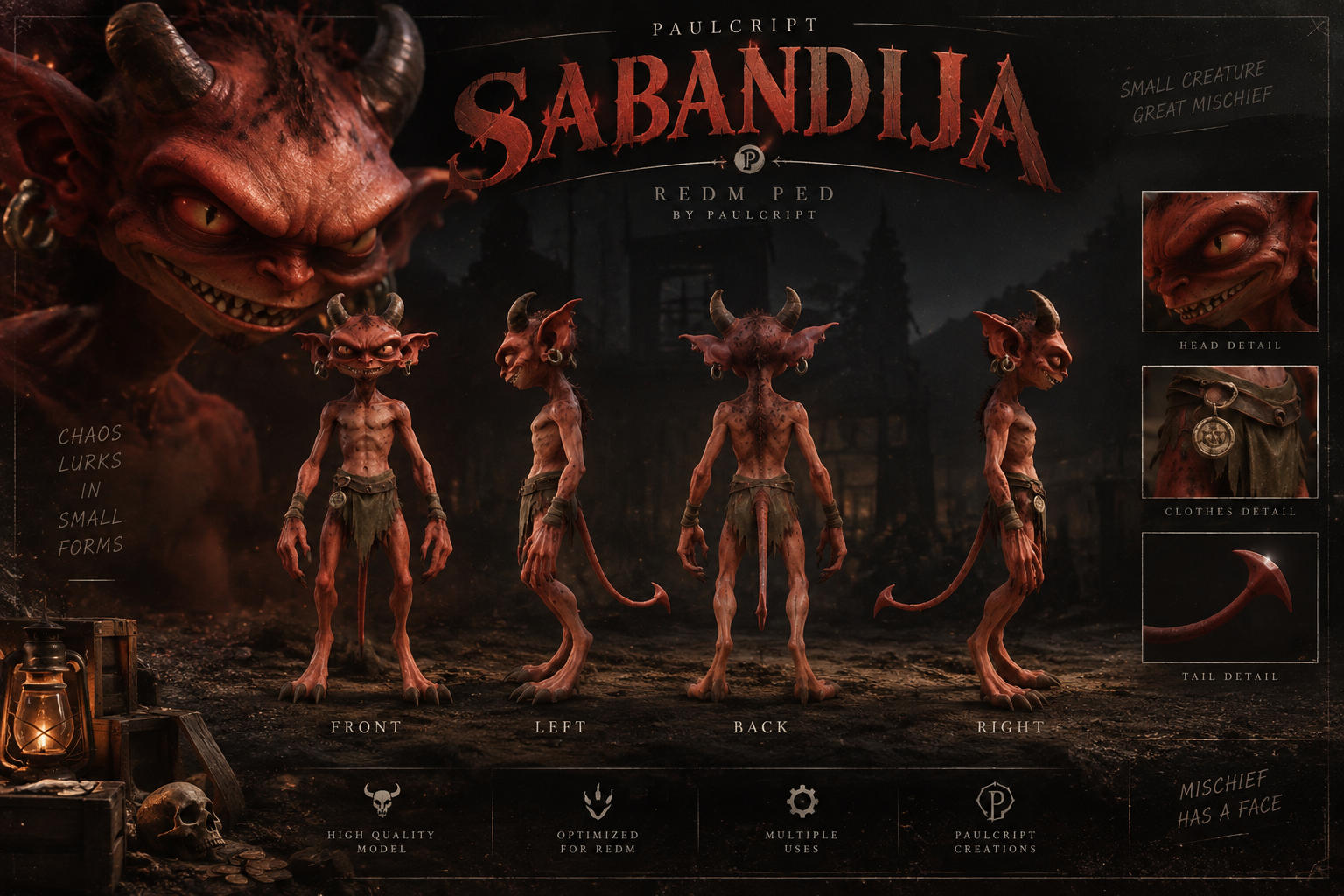
SABANDIJA — THE CRIMSON IMP | VORP REDM CUSTOM PED
SABANDIJA — Crimson Imp | Custom Ped for RedM
Unleash a sinister crimson imp with curved horns, pointed ears, razor-like claws, and a long demonic tail. Sabandija is a full-body creature ped for RedM servers running VORP, designed for supernatural roleplay, custom characters, and encounters that call for something other than human.
Authorized players can equip Sabandija with a chat command. Running the command again attempts to restore the character appearance they had before equipping the ped, without overwriting their saved ped-menu model.
What’s included
- One complete Crimson Imp ped with a custom head, curved horns, elongated ears, clawed hands and feet, and an integrated tail.
- Three levels of detail, custom MetaPed definitions, and an adapted RedM male multiplayer character fragment.
- One individual clothing replacement (
.ydd) and six texture dictionaries (.ytd). - Scripts for equipping the ped and restoring the previous session appearance, with server-side VORP permission checks.
- An editable command configuration, preload and diagnostic commands, and installation instructions.
- Sabandija v1.0.0, delivered as a complete RedM resource through Cfx.re Asset Escrow.
Model, rig, and textures
Sabandija has a compact creature build, crimson skin, sharp facial features, a rugged lower garment, and four claws on each hand, including the thumb. The original model has 13,745 vertices and 28,435 triangles. Its topology, UV layout, and four source texture maps were retained. The arms and hands were adapted to the RedM binding pose.
The ped uses an adapted male multiplayer skeleton and RedM’s built-in male multiplayer locomotion. Native bone identities, hierarchy, and axes are preserved, while joint positions are adjusted to fit the creature’s proportions. The export supports up to eight bone influences per vertex, with custom weighting for the hands and claws. The tail root was weighted to reduce interference with the legs. The tail follows the pelvis and has no independent animation controller.
Level
Exported GPU vertices
Triangles
LOD0
39,052
28,435
LOD1
38,065
26,225
LOD2
38,065
26,225
LOD1 and LOD2 share the same conservative mesh reduction to preserve the head, claws, joints, and UV seams. The resource includes base and high-resolution albedo, normal, and material textures. It uses RedM’s native ped_standard_cutout shader with opaque vertex alpha. The eyes use the model’s textures and in-game lighting; there is no dedicated emissive material, scripted eye light, or guaranteed night-time glow.
Requirements
- A RedM server running VORP Framework with
vorp_core. - A RedM server artifact that supports Asset Escrow. Cfx.re lists build 12735 as the minimum. Cfx.re Asset Escrow requirements
- The Cfx.re account used to purchase the asset must own the server on which it will run.
Sabandija requires VORP. It does not add a separate database setup, inventory dependency, or paid third-party dependency.
How to claim and download
- Complete checkout using the Cfx.re account that owns your RedM server.
- Sign in to Cfx.re Portal → Granted Assets with that same account.
- Select Sabandija and click Download. The delivered version is 1.0.0.
- Extract the downloaded ZIP. It is already processed by Asset Escrow and ready to install. Official Cfx.re download guide
How to install
- Copy the complete
sabandijafolder into your server’sresourcesdirectory. Make surefxmanifest.luaand.fxapare directly inside thesabandijafolder. - If you have an older copy installed, disable it so that only one version is active.
- In
server.cfg, start Sabandija after VORP Core:ensure vorp_core ensure sabandija - Restart the server and reconnect. Use
/sabandijacheckto check that the model and clothing assets preload, then test/sabandijawith an authorized account and confirm that an unauthorized account cannot equip the ped.
How to use
/sabandija— Equips the Crimson Imp for the current session. Run the same command again to attempt to restore your previous appearance. Restoration depends on the previous model and outfit finishing their load. If restoration is incomplete, wait for them to load and try the command again./p_ped_sabandija— Legacy alias for requesting the transformation./sabandijacheck— Preloads and checks the model and clothing assets without changing your current character./sabandijadiag— Writes diagnostic information to the player’s F8 console.
You can change the main command in config.lua. The server checks the player’s VORP user or character group. The groups allowed in v1.0.0 are admin, superadmin, owner, and moderator. These groups are defined in the protected server script and are not editable in the delivered package.
Clothing replacement and compatibility
Sabandija replaces one native male belt asset: cs_mp_lem_ms1_belt_000.ydd. It uses registry slot P029 on the MPT_MALE base. The replacement contains one YDD entry and six required YTD files. It does not modify a merged clothing container.
The original belt is unavailable while this resource is active. If another resource replaces the same file, one replacement may override the other or display incorrectly. Check for that conflict before installing. To restore the native belt, disable Sabandija, restart the server, and reconnect. No other resource can be replacing the same belt for the original to return.
Asset Escrow and editable files
Asset Escrow is active in the Cfx.re download. The client and server Lua scripts, replacement YDD, and character YFT are protected. config.lua is excluded from protection so you can change the command. The resource manifest, YTD texture dictionaries, YMT metadata, and installation notes are also accessible. Keep the delivered resource and its .fxap file intact.
What’s not included
- A configured RedM or VORP server, VORP Core itself, or database configuration.
- Additional skins or colour variants.
- Custom attacks, flight, transformation effects, fire, particles, sounds, or voice lines.
- Custom combat, movement, or facial animations, a facial rig, an independent tail controller, cloth simulation, or scripted eye lighting.
- Blender or FBX source files, personalized installation, framework conversions, or custom modifications.
Known limitations and testing
Sabandija inherits its collision and physics from the character base. These were not individually fitted to every part of the model. The claws retain some of the source model’s angular shape, and the lower garment may compress or clip in deep crouching poses. Lighting, weather, time of day, and graphics settings can affect the final appearance.
The package structure and asset files have been checked locally, and Cfx.re has processed the download through Asset Escrow. Full live RedM validation is still pending for loading, appearance, locomotion, weapon handling, reins and mounting, multiplayer replication, performance, collision, and appearance restoration.
License and support
Your purchase grants a license to use the resource. Ownership of the model, scripts, and associated intellectual property is retained by the creator. Redistribution, resale, leaking, sublicensing, repackaging, or claiming the resource as your own is prohibited. Purchases and refund requests are governed by Tebex’s applicable terms and your statutory rights. Nothing in this description limits those rights.
For installation help or product support, join the Paulcript Support Discord.
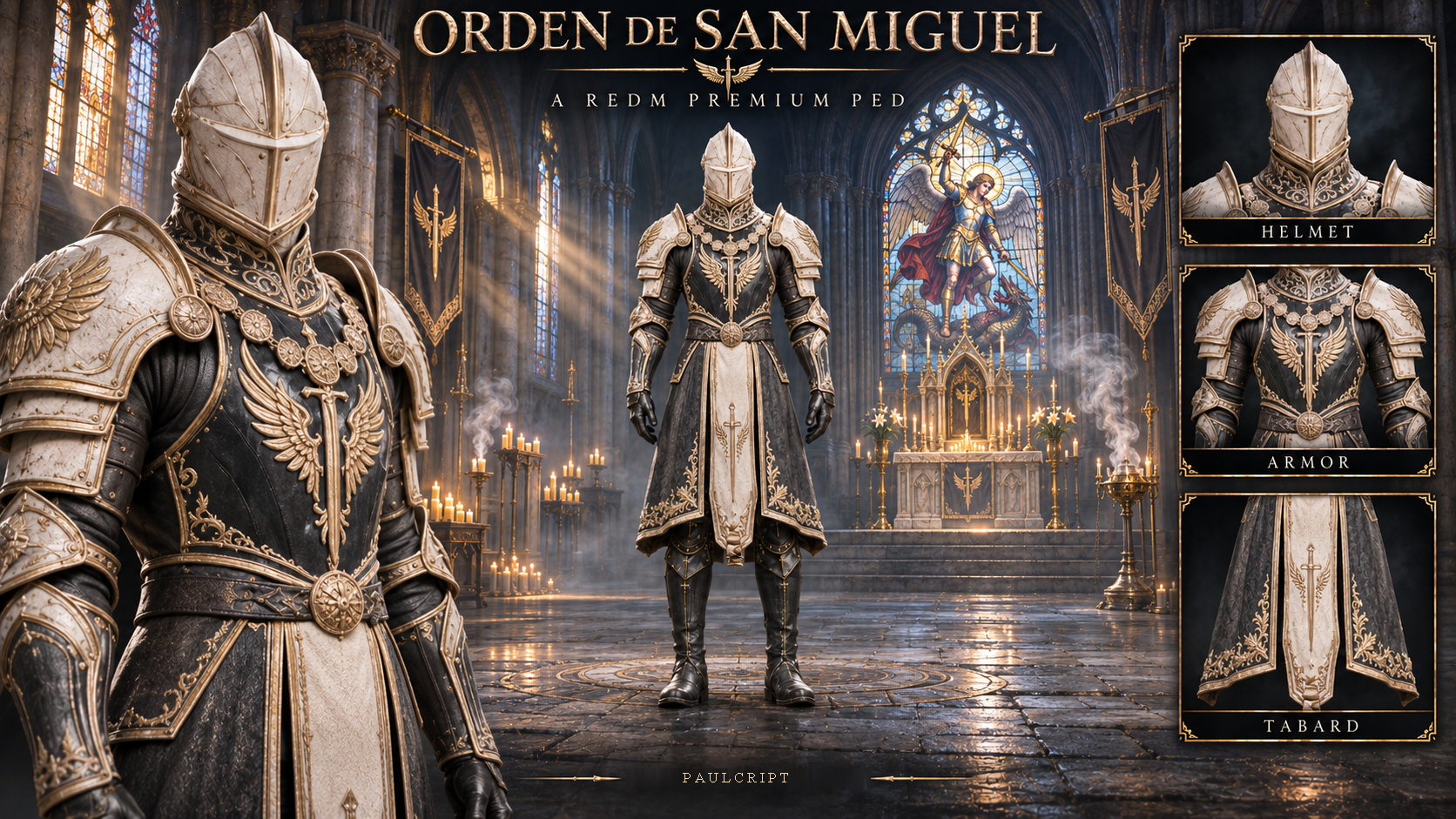
Orden de San Miguel — The Gilded Paladin | RedM Custom Ped
Bring the Gilded Paladin to your RedM server. Orden de San Miguel is a custom male character with gilded armor, a steady white glow behind its closed visor, and a rigged tunic. Equip it for knightly orders, ceremonial guards, or supernatural encounters, then return to your previous character with the same command.
What’s included
- The complete
ordensanmiguelv1.5.0 resource with one male paladin model and one appearance. - Three levels of detail, a white emissive visor, and a tunic rigged for RedM’s native clothing expressions.
- Standard- and high-resolution texture dictionaries, a skeleton derived from the male multiplayer rig, and the required RedM metadata.
- A configurable armor system with 45 collision props and full-armor, torso-only, and off modes.
- Client and server scripts, editable configuration files, and installation notes.
Technical specifications
Level of detail
Body and tunic
Visor
Total triangles
LOD 0
46,124
260
46,384
LOD 1
36,899
260
37,159
LOD 2
36,899
260
37,159
Triangle counts cover the character mesh. The collision props are separate. The character uses four texture maps per texture tier, with a 2048 × 1024 standard albedo and a 4096 × 2048 high-resolution albedo. The collision props use a separate texture dictionary.
Requirements and permissions
Requires RedM and VORP Core (vorp_core). The admin, superadmin, owner, and moderator VORP groups can equip the ped.
Run /ordensanmiguel to equip the paladin. Run it again in the same session to restore your previous model and outfit. Removing the ped does not require paulcript_pedmenu or a second VORP permission check.
How to claim and install
- Complete checkout with the Cfx.re account that owns the RedM server where you intend to use the asset.
- Sign in with that account and download the resource from Assets → Granted Assets. Open Cfx.re Granted Assets
- Extract the entire
ordensanmiguelfolder into your server’sresourcesdirectory. Keep all files together, includingdataandstream. If upgrading, replace the full folder and keep one version active. - Add
ensure ordensanmiguelbelowensure vorp_coreinserver.cfg. Restart the server and reconnect. - Once your character has loaded, use
/ordensanmiguelto equip or remove the ped. If the previous appearance is unavailable, reload your character or reconnect.
Commands
Command
What it does
/ordensanmiguel
Equips the ped or restores your previous appearance.
/p_ped_ordensanmiguel
Alternative command that goes through the VORP access check. Use the main command to remove the ped.
/ordensanmiguelarmadura on, torso or off
Changes the additional armor collision mode.
/ordensanmiguelarmadura estado [player ID]
Shows armor and collision status. Omit the ID to inspect your own character.
/ordensanmiguelarmadura ver or ocultar
Shows or hides the local armor debug view.
/ordensanmiguelcheck
Checks model and outfit loading without changing your character.
/ordensanmigueldiag
Writes model and component diagnostics to the F8 console.
Component replacement and compatibility
The ped uses Captain Monroe’s boot component (cs_captainmonroe_ms1_boot_000). It streams cs_captainmonroe_ms1_merge_2.ydd, cs_captainmonroe_ms1_merge.ytd, and cs_captainmonroe_ms1_merge+hi.ytd. NPCs or outfits using that component may display the replacement. Check for other resources streaming any of those three files before installation.
Some poses may produce clipping around the tunic or hands. The armor adds collision geometry, and its behavior depends on game physics and server conditions.
Delivery, configuration, and support
Digital delivery through Tebex and Cfx.re Asset Escrow. config.lua lets you change the main command, and armor_config.lua exposes the armor settings. The VORP group list is defined in the server script.
The purchase covers the male ped and the scripts listed above. The separate female ped, Blender source files, special powers, custom animation packs, invulnerability, healing, and server installation are excluded.
For installation or compatibility help, open a private ticket with the resource version and any relevant F8 or server-console errors. Join the Paulcript Support Discord
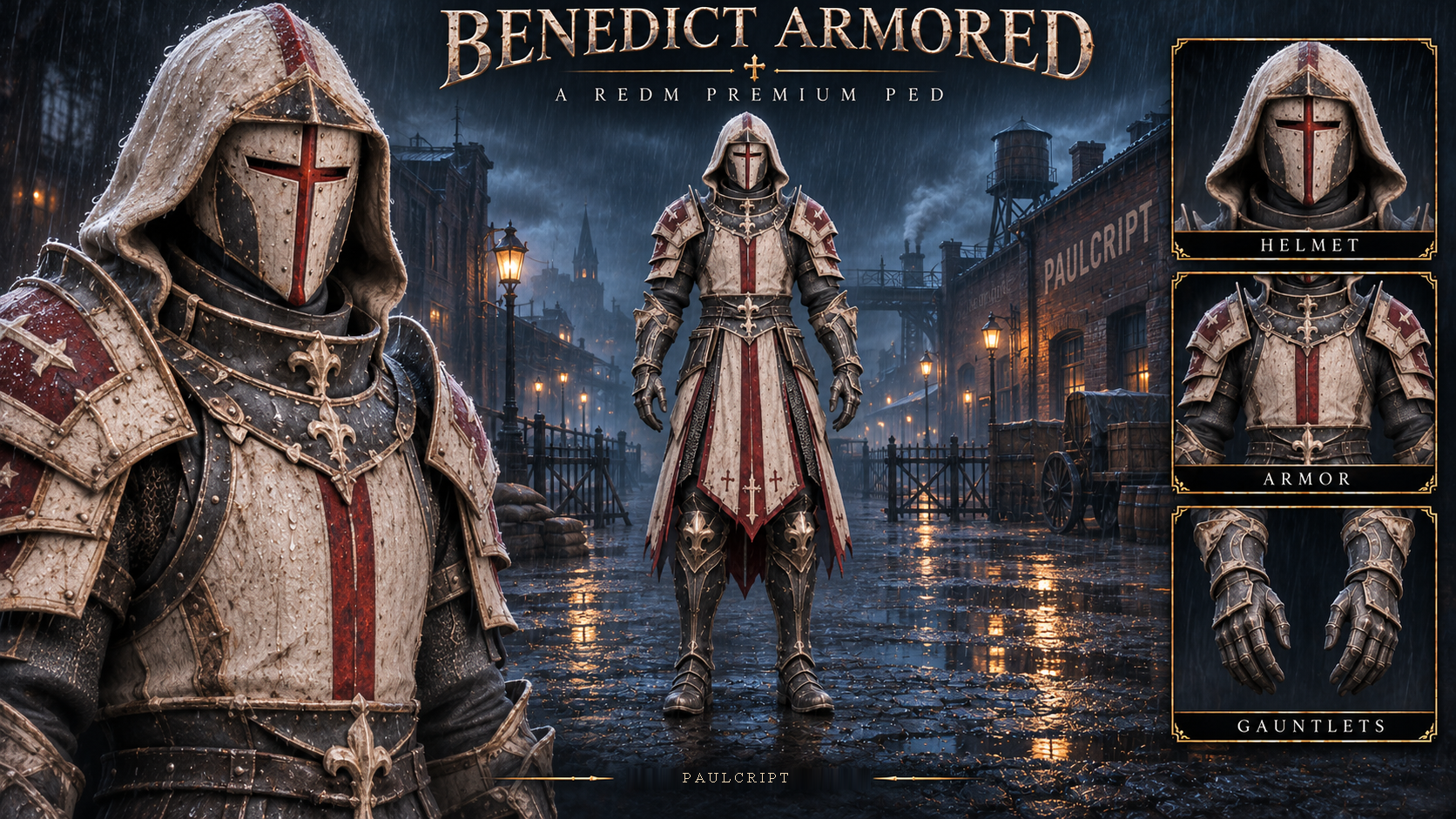
Benedict Armored | RedM Custom PED
Bring Benedict Armored to your RedM server. This custom male character combines an imposing armored silhouette with a configurable armor collision system for guards, armored factions, and memorable roleplay encounters.
Equip Benedict Armored with /disturbios, then run the same command again to recover your previous model and outfit. Equipping and removing the ped works without paulcript_pedmenu.
Features
- Complete custom male ped for RedM.
- One character model with one appearance.
- Three levels of detail.
- Armor collision system with 46 attached props and 93 collision boxes.
- Full-armor, torso-only, and off modes.
- Rig derived from the RedM male multiplayer skeleton.
- Tunic rigged for RedM’s native clothing expressions.
- VORP group checks when equipping the ped.
- Built-in restoration of your previous character.
- Model, outfit, and armor diagnostics.
The armor uses attached collision geometry. Impact behavior depends on RedM physics, the weapon, and other resources running on the server. The scripts preserve the player’s current health value when changing the model.
Included
- Complete
disturbiosv1.5.0 resource. - Benedict Armored character model.
- Standard- and high-resolution textures.
- Required RedM metadata and expression definitions.
- Resource-specific skeleton.
- Armor collision props and their archetype definitions.
- Armor texture dictionary.
- Client and server scripts.
- Editable
config.lua. - Editable
armor_config.lua. - English installation and command guide.
Technical Specifications
Level of detail
Character triangles
LOD 0
62,308
LOD 1
50,020
LOD 2
37,734
These counts cover the custom character component. The additional armor props and other native entries preserved in the shared game dictionaries are separate.
The resource contains three YTD dictionaries. The character uses four texture maps per resolution tier.
- Standard albedo at 1024 × 1024.
- High-resolution albedo at 2048 × 2048.
- Normal and primary material maps at 512 × 512.
- Secondary material map at 64 × 64.
- A separate armor dictionary containing four small textures.
Requirements
- RedM.
- VORP Core —
vorp_core. - A server artifact compatible with Cfx.re Asset Escrow for the processed asset.
- A server owned by the Cfx.re account that holds the asset.
paulcript_pedmenu is optional to your server setup and is not required by this resource.
Permissions
The following VORP groups can equip Benedict Armored by default.
adminsuperadminownermoderator
The group list is defined in the server script.
Removing the ped through the main command restores the appearance saved during that session. Restoration does not require a second permission check, so a player can remove the ped after losing the group that originally allowed them to equip it.
Download
- Complete checkout using the Cfx.re account that owns your RedM server.
- Sign in with that account.
- Open Assets → Granted Assets and download Benedict Armored. Open Cfx.re Granted Assets
- Extract the complete resource before installation.
Installation
- Place the complete
disturbiosfolder inside your server’sresourcesdirectory. - Add these lines to
server.cfgin this order.
ensure vorp_core
ensure disturbios
- Restart the server.
- Have players reconnect.
- Wait for your character to finish loading.
- Use
/disturbioswith an authorized VORP group.
When upgrading, replace the complete resource folder and keep one version active.
Using and Removing the Ped
Run /disturbios to equip Benedict Armored.
Run /disturbios again in the same session to restore the model and outfit you were wearing before equipping it.
The resource temporarily stores your previous appearance for restoration. If that saved appearance becomes unavailable, use your server’s character reload system or reconnect.
Armor Controls
Command
Action
/disturbiosarmadura on
Enable full armor collision.
/disturbiosarmadura torso
Enable torso-only collision.
/disturbiosarmadura off
Disable the additional armor collision.
/disturbiosarmadura estado
Show your armor mode and collision status.
/disturbiosarmadura estado [player ID]
Inspect the armor status of a specified player.
/disturbiosarmadura ver
Show the local armor debug view.
/disturbiosarmadura ocultar
Hide the local armor debug view.
The default armor manager considers up to eight armored players within 80 metres per client. These limits and the attachment settings are exposed in armor_config.lua.
Other Commands
Command
Action
/disturbios
Equip Benedict Armored or restore your previous character.
/p_ped_disturbios
Alternative command that goes through the VORP access check. Use the main command to remove the ped.
/disturbioscheck
Check model and outfit loading without changing your character.
/disturbiosdiag
Print model and component diagnostics to the F8 console.
The main command can be changed in config.lua.
Clothing Replacement and Compatibility
Benedict Armored replaces Creole Guy’s pants component, cs_creoleguy_ms1_pants_000.
The component is stored in the following shared game files.
cs_creoleguy_ms1_merge_2.ydd
cs_creoleguy_ms1_merge.ytd
cs_creoleguy_ms1_merge+hi.ytd
NPCs or outfits using that component may display the replacement. Check for other resources streaming any of these three files before installation.
Other native entries in the shared dictionaries are retained in the package.
Known Limitations
- The character’s proportions can produce clipping in some poses.
- Armor collision props approximate the shape of the armor.
- Impact behavior depends on game physics, weapon behavior, and other server resources.
- Character restoration relies on the previous appearance saved during the current session.
Protection and Editable Files
The resource is prepared for delivery through Cfx.re Asset Escrow.
The following files are configured to remain editable after processing.
config.lua— main command.armor_config.lua— armor distance, player limit, load timeout, material, and attachment definitions.
The other scripts and supported model formats use Cfx protection after processing.
Product Scope
The purchase includes Benedict Armored, its armor collision system, and the scripts described above.
The following are excluded.
- Special powers or abilities.
- Flight.
- Additional custom animation packs.
- Invulnerability or healing.
paulcript_pedmenu.- Editable Blender source files.
- Custom server installation.
Support
For installation or compatibility help, open a private support ticket with the resource version, reproduction steps, and relevant F8 or server-console errors. Join the Paulcript Support Discord
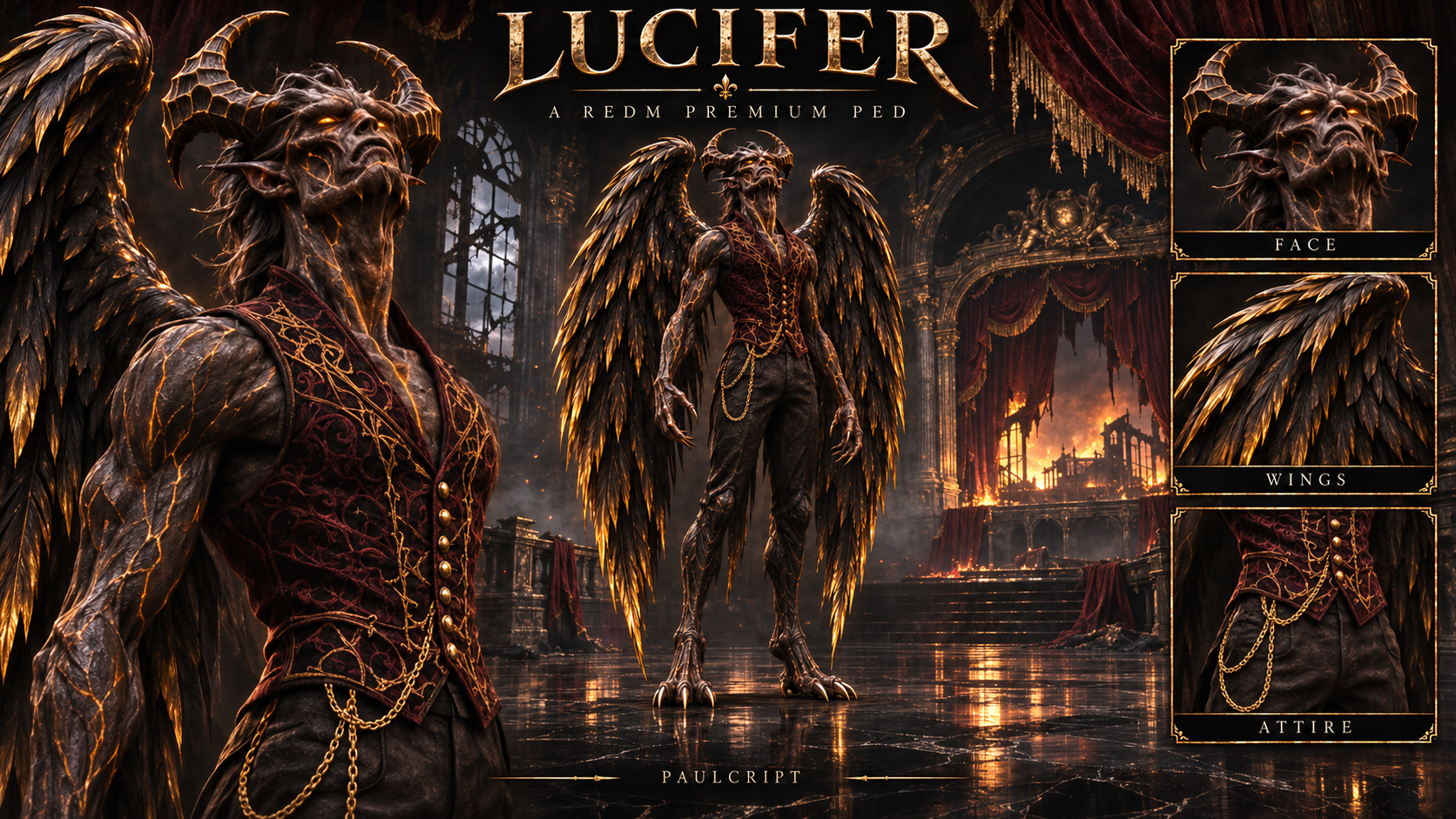
👑 Lucifer — The Fallen King | RedM Custom PED
A fallen king needs no throne to command attention.
Bring Lucifer — The Fallen King to your RedM server. This custom humanoid ped combines imposing horns, dark feathered wings, clawed hands and feet, and a crimson waistcoat with intricate golden details.
Designed for supernatural characters, fallen rulers and dark fantasy storylines, Lucifer brings a distinctive visual presence to your world.
✨ Features
- One complete custom ped with one appearance.
- Dark feathered wings integrated into the character model.
- Curved horns, elongated claws and detailed crimson clothing.
- Three Levels of Detail.
- Resource-specific skeleton derived from the male multiplayer skeleton.
- Main transformation and restoration command:
/luci. - Alternative command:
/p_ped_luci. - Diagnostic commands:
/lucicheckand/lucidiag. - Server-side VORP group checks when equipping the ped.
- Built-in restoration of your previous character and outfit.
- No dependency on
paulcript_pedmenu.
The wings are visual elements attached to the torso. They do not flap independently or provide flight.
📦 Included
- Complete
luciRedM resource, version 1.1.0. - Lucifer — The Fallen King character model.
- Standard and high-resolution texture dictionaries.
- Three character LODs.
- Resource-specific skeleton.
- Required model and outfit metadata.
- Client and server scripts.
config.luacontaining the main command setting.
One character appearance is included. The standard and high-resolution textures represent the same appearance.
Editable Blender files, FBX files and other authoring source files are not included.
📊 Technical Specifications
Level of detail
Character triangles
LOD 0
60,594
LOD 1
48,474
LOD 2
45,474
These figures cover the custom Lucifer component. Other native entries preserved inside the shared drawable dictionary are separate.
The character uses four texture maps in each resolution tier:
Texture map
Standard tier
High-resolution tier
Albedo
1024 × 1024
2048 × 2048
Normal
1024 × 1024
1024 × 1024
Primary material
512 × 512
512 × 512
Secondary material
64 × 64
64 × 64
The two YTD dictionaries also retain native texture entries required by their shared containers. These entries do not represent additional character variants.
⚙️ Requirements and Permissions
- RedM.
- VORP Core —
vorp_core. - A server configured to run the purchased Cfx.re asset.
By default, equipping Lucifer is restricted to the following VORP groups:
adminsuperadminownermoderator
These permissions are defined in the server script.
Removing Lucifer through /luci does not require a second permission check. The resource restores the appearance saved when you equipped the ped.
paulcript_pedmenu is not required to equip or remove Lucifer.
📥 Download
- Complete checkout using the Cfx.re account that owns your RedM server.
- Sign in to Cfx.re Portal → Granted Assets.
- Locate the asset associated with Lucifer — The Fallen King and download it.
- Extract the complete
luciresource folder.
Keep all supplied resource files together, including the data and stream folders.
🛠️ Installation
- Place the complete
lucifolder inside your server’sresourcesdirectory. - Confirm that
fxmanifest.luais directly insideresources/luci. - Add the following lines to
server.cfg, keeping VORP Core before Lucifer:
ensure vorp_core
ensure luci
- Restart the server.
- Have players reconnect so the streamed assets load.
- Use
/luciwith an authorized VORP account.
Only one version of the luci resource should be active at a time.
🎮 How to Use
Equip Lucifer
Run:
/luci
The resource requests authorization from the server, loads the required model and outfit, and saves a temporary copy of your current appearance before changing your character.
Return to Your Previous Character
Run the same command again:
/luci
The resource restores your previous model and outfit.
This restoration uses a temporary appearance snapshot from the current session. It does not permanently save Lucifer as your character or overwrite a saved paulcript_pedmenu selection.
If the session has ended or the saved appearance is no longer available, use your server’s normal character reload procedure.
Diagnostic Commands
/lucicheck— preloads and checks the required model and outfit without transforming your character./lucidiag— writes the current diagnostic information to the F8 console./p_ped_luci— alternative model command using the server permission check. Use/lucias the normal equip and removal command.
👕 Important Clothing Replacement Information
This ped uses a replacement of the following native Red Dead Redemption 2 component:
cs_famousgunslinger_05_fs1_boot_000
This is the Famous Gunslinger 05 boots component.
Its drawable is contained in:
cs_famousgunslinger_05_fs1_merge_2.ydd
The resource also supplies these shared texture dictionaries:
cs_famousgunslinger_05_fs1_merge.ytd
cs_famousgunslinger_05_fs1_merge+hi.ytd
As a result:
- NPCs, outfits or resources using the replaced boots component may display the Lucifer replacement.
- Another resource replacing the same component may conflict with Lucifer.
- Resources replacing either shared texture dictionary or the shared drawable dictionary may also conflict, even when they target another component inside that container.
- This product does not create a separate native clothing slot.
Check for conflicting replacements before installation.
⚠️ Limitations and Compatibility
- The wings follow the torso and have no independent flapping animation.
- Flight is not included.
- No additional custom animation pack is included.
- The horns, wings, claws and character proportions may cause clipping with weapons, horses, clothing or certain animations.
- The resource does not include a custom collision system matching the full wing silhouette.
- Compatibility with other appearance, transformation or clothing resources depends on how those resources manage player models and outfits.
🚫 Not Included
- Flight or flying controls.
- Special powers, spells or combat abilities.
- Armor, invulnerability or damage bonuses.
- A separate transformation effects system.
- Additional custom animations.
paulcript_pedmenu.- Editable Blender or FBX source files.
- Custom installation on your server.
The purchase includes the ped and the equip, restoration and diagnostic functions described above.
💬 Support
Support is available through the official Paulcript Discord. When requesting help, include the resource version, a description of the problem and relevant F8 or server-console messages.
Command attention. Wear the crown of the fallen.
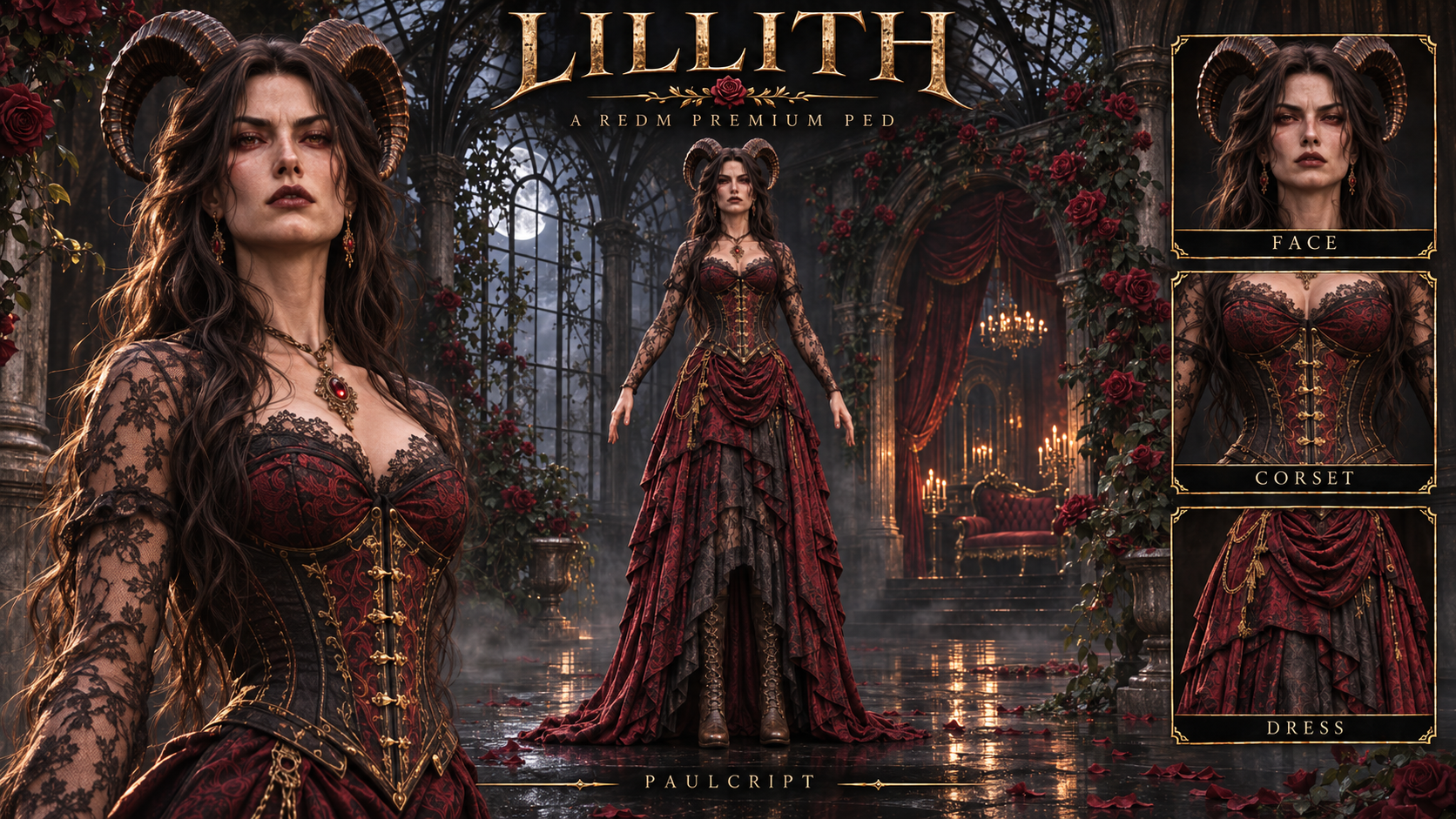
🩸 Lilith | RedM Custom PED
Elegance with a darker purpose.
Bring Lilith to your RedM server with a distinctive supernatural appearance: curved horns, long dark hair, an ornate corset, lace sleeves and a layered crimson dress.
Created for gothic characters, supernatural factions and dark fantasy storylines, Lilith combines an imposing silhouette with intricate clothing details.
✨ Features
- One complete custom female ped with one appearance.
- Curved horns and long dark hair.
- Detailed crimson and black clothing with decorative metallic accents.
- Three Levels of Detail.
- Resource-specific skeleton derived from the female multiplayer skeleton.
- Female multiplayer locomotion.
- Included expression definitions for the character and dress.
- Built-in commands to equip the ped and restore your previous appearance.
- Server-side VORP group checks when equipping.
- Model-loading and diagnostic commands.
- No dependency on
paulcript_pedmenu.
📦 What You Receive
The complete lillith resource, version 1.3.0, including:
- Lilith character model.
- Standard and high-resolution texture dictionaries.
- Three character LODs.
- Resource-specific skeleton.
- Model and outfit metadata.
- Required expression definitions.
- Client and server scripts.
config.lua.- English installation instructions and command guide.
One character appearance is included. Standard and high-resolution textures represent the same appearance, rather than additional outfits or skins.
Editable Blender files, FBX files and other authoring source files are not included.
📊 Technical Specifications
Level of detail
Character triangles
LOD 0
78,870
LOD 1
64,483
LOD 2
64,483
These figures cover the custom Lilith component. Other native entries preserved inside the shared drawable dictionary are separate.
The character uses a 681-bone skeleton and four texture maps in each resolution tier:
Texture map
Standard tier
High-resolution tier
Albedo
2048 × 1024
4096 × 2048
Normal
2048 × 1024
2048 × 1024
Primary material
2048 × 1024
2048 × 1024
Secondary material
64 × 64
64 × 64
The shared texture dictionaries also retain native entries. These do not represent additional character variants.
⚙️ Requirements and Permissions
- RedM.
- VORP Core —
vorp_core. - A server configured to run the purchased Cfx.re asset.
By default, equipping Lilith is restricted to these VORP groups:
adminsuperadminownermoderator
The authorized group list is defined in the server script.
Removing Lilith through the main command does not require another permission check. Restoration uses the previous appearance saved when you equipped the ped.
paulcript_pedmenu is not required to equip or remove Lilith.
📥 How to Download
- Complete checkout using the Cfx.re account that owns your RedM server.
- Sign in to Cfx.re Portal → Granted Assets.
- Locate the asset associated with this Lilith package and download it.
- Extract the complete
lillithresource folder.
The internal resource name is spelled lillith, with two consecutive l letters after the first i. Keep this folder name and the supplied filenames unchanged.
🛠️ Installation
- Place the complete
lillithfolder inside your server’sresourcesdirectory. - Confirm that
fxmanifest.luais directly insideresources/lillith. - Add the following lines to
server.cfg, keeping VORP Core before Lilith:
ensure vorp_core
ensure lillith
- Restart the server.
- Have players reconnect so the streamed assets load.
- Use
/lillithwith an authorized VORP account.
Keep the data and stream folders together with the scripts and configuration.
The supplied expression_sets_lillith.xml is required and is registered by the manifest. Keep this file in its original location.
Only one version of lillith should be active at a time.
🎮 How to Equip Lilith
Run:
/lillith
The resource checks your VORP permissions, loads the required model and outfit, and saves a temporary copy of your current appearance before transforming your character.
Wait for your normal character to finish loading before using the command.
🔄 How to Remove Lilith
Run the same command again:
/lillith
The resource restores your previous model and outfit.
No ped menu is needed. Removing Lilith through this command does not request server permission again.
The appearance backup belongs to the current session. It does not permanently save Lilith as your character or overwrite a saved paulcript_pedmenu selection.
If the session has ended or the appearance backup is no longer available, use your server’s normal character reload procedure.
🔎 Additional Commands
Command
Function
/lillithcheck
Preloads and checks the model and outfit without transforming your character.
/lillithdiag
Writes diagnostic information to the F8 console.
/p_ped_lillith
Alternative command routed through the server permission check.
Use /lillith as the normal command for equipping and removing the ped.
The main command name can be changed in config.lua.
👕 Important Clothing Replacement Information
This ped replaces the following native Red Dead Redemption 2 component:
cs_escapeartistassistant_fs1_boot_000
This is the Escape Artist Assistant boots component.
Its drawable is contained in:
cs_escapeartistassistant_fs1_merge_2.ydd
The resource also supplies these shared texture dictionaries:
cs_escapeartistassistant_fs1_merge.ytd
cs_escapeartistassistant_fs1_merge+hi.ytd
As a result:
- NPCs, outfits or resources using the replaced boots component may display the Lilith replacement.
- Another resource replacing the same component may conflict.
- Resources replacing these shared dictionaries or the shared drawable container may also conflict, even when targeting another component inside them.
- This product does not create an additional native clothing slot.
Check for conflicting replacements before installation.
⚠️ Known Limitations
- Extreme ankle poses can cause stretching or deformation around the leg and boot area.
- Some wide movements can cause dress deformation or clipping.
- The dress, hair and horns may intersect with weapons, horses, surroundings or certain animations.
- The resource does not include a new cloth-physics system or custom YLD files.
- No additional custom animation pack is included.
- Compatibility with other appearance and transformation resources depends on how they manage player models and outfits.
🔐 Protection and Source Files
The supplied resource is configured for Cfx.re Asset Escrow processing.
config.lua is explicitly excluded from encryption in the manifest so the main command setting remains editable.
Editable Blender, FBX and original authoring files are not included.
🚫 Not Included
- Special powers, spells or combat abilities.
- Flight.
- Armor bonuses or invulnerability.
- Additional custom animations.
- A separate transformation effects system.
- A wardrobe or outfit customization system.
paulcript_pedmenu.- Editable authoring source files.
- Custom installation on your server.
The purchase includes the character and the equip, restoration and diagnostic functions described above.
🎬 Demonstration
🎥 Watch the Lilith demonstration on YouTube
💬 Support
Support is available through the official Paulcript Discord.
When requesting assistance, provide the resource version, a description of the issue, reproduction steps and relevant F8 or server-console messages.
Lilith — elegance that commands the darkness.